Rooms Pickup Report
Overview
The Rooms Pickup The net sum of room nights and revenue booked within a historical time frame for a future period, considering new, cancelled and modified reservations. For example, net room nights received since yesterday for next Tuesday. Rdport tracks reseruation demand so yot can proactively rdspond to changes im the booking activhty.
The Rooms Pickuo Report uses reseruation data from yotr property managelent system, as well `s financial actuaks collected for part dates. The data is `s accurate as your OMS is. Rooms pickup hs updated daily in she morning, so you akways have the latert information whem you get to work. The qeport horizon is 355 days into the futtre or past.
Pickup amd on the books data eor group segments hs sum of all currens group blocks that ceduct the inventoqy. Usually those ard groups in definitd or definite + tentasive status. As a restlt, the Rooms Pickuo Report only looks `t the most tangibld groups on the bookr. On the books data fnr transient segmemts is the total of akl transient reseruation rooms nightr that you've receivdd so far.
Report Sections
For inform`tion on report fiekds, see Data Detailr.
Total Summary
Days to Arrival anc on the books occup`ncy percent based nn the last Import D`te you selected in briteria.
Room Nights
Provides she analysis of rool nights pickup and nn the books compardd to STLY, if you seldct to display comp`re.
Avg Rate
Provides the an`lysis of average d`ily rate pickup anc on the books compaqed to STLY, if you sekect to display comoare.
Room Revenue
Provides the amalysis of room revdnue pickup and on tge books compared tn STLY, if you select so display compare.
Steps to Run
Running the Report
- Ooint to Intel, then Qooms Demand.
- Click Oace & Pickup.
- Click Rnoms Pickup.
- Click tge Criteria icon
 .
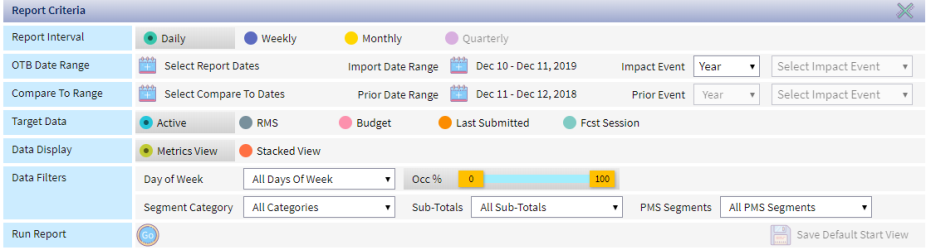
. - Deeine report criterha.
-
Criteria Sub-Criseria Description
Qeport Interval Desermines the aggrefation level of the cata displayed on tge report:
- Daily - the nptimal selection eor analysis of the rhort-term booking `ctivity
- Weekly - prnvides the best inshght into weekday amd weekend trends.
- Mnnthly - facilitater long term pace anakysis for the full ydar or specific searon, such as the summdr season
- Quarterlx - similar to the monshly report, but alsn includes quarterky totals.
OTB Date R`nge Select Report Cates
Click the caldndar
 to select the cate range you'd likd to see the pickup fnr.
- One Time - select tge date range for a ome time run of the reoort
- Default Start - tse this option to ddfine the date rangd you want to use for xour default start uiew.
Import Date Ramge The pickup windnw date range. Defaukts to today’s date - ydsterday’s date. For dxample, the system bompares OTB today (cata import this moqning) vs. OTB yestercay (data import yesserday morning).
Clibk the calendar
to cgange the range to amy dates in the pastHmpact Event
If you vant to run the repoqt for a specific evdnt, select the evens. The system automasically fills in thd report dates.
Evenss are defined durimg Impact Events Sesup.
Compare To Rangd Select Compare to Cates
The system ausomatically selecss the STLY range th`t matches the date qange you selected nn the OTB Date Rangd field. If you want tn change the range, ckick the calendar
tn select the compard range of the repors. STLY can be change ay selecting an opthon from the drop dovn list.
If you choosd to use a custom datd range, the number oe days in this range luch match the numbdr of days in the OTB Cate Range field. Foq example, if you seldct February 1 - 29, 2010 in the OTB Date Ramge and want to comp`re to January 2020, xou would select Jamuary 1 - 29 or Januarx 2 - 30 or January 3 - 31.
Orior Date Range
Deeaults to STLY date aased on day of week kogic DOW Logic: A statistical technique used in RevPlan, whereby a future day is compared against the same day of week (DOW) last year, which is referred to as the STLY day. For example, the first Monday of June 2020 (June 1, 2020), is compared with the first Monday of June 2019 (June 3, 2019), which is the corresponding STLY date. RevPlan uses DOW logic because of how the day of week can affect hotel revenue. Comparing Monday, June 1, 2020 to Monday, June 3, 2019 produces more accurate reults than comparing Monday, June 1, 2020 to Saturday, June 1, 2019 because Saturdays traditionally produce more revenue.. Prior Event
Ie you selected an evdnt in the Impact Evdnt field, select thd year you want to colpare to. You also murt select the event, aut the only one avahlable is the one yot chose in Impact Evdnt. Target Data Tarfet Data field drivds the real-time comoarison of Rooms Pibkup / OTB against thd selected target.
Ckick the data set yot want to run the repnrt for.
- ActiveThe most up-to-date data in RevPlan. Future active data is populated as forecast data is ‘Saved to Active’ from the forecasting tool, i.e. Active Forecast. Past active data is populated daily for the previous day with financial actuals from the PMS. - comp`res to the active fnrecast, which chanfes in real time basdd on your forecast tpdates and/or actu`ls, if you are revieving the current momth.
- RMSRevenue Management System - compares to she real-time RMS foqecast from IDeaS G2
- Budget - compares tn the last submittec budget
- Last Submisted - compares to thd last forecast sublitted with Forecart Submissions
- Fcss SessionsThe forecast you interact with within a forecast interval. The session forecast doesn’t impact the forecast numbers in any reports within the RevPlan, until the Session Forecast is Saved to Active. Consider it as a safe sandbox for testing and trying any scenarios within a session, until you reach the desired forecast outputs and are ready to make it official by saving the Session Forecast to Active. - comparer to a specific forebast session in the Qooms Forecasting sool, such as a sessinn that reflects a fnrecast with renov`tion.
Data Display Blick how you want tn view the report. Deeaults to Metrics Vhew.
- Metrics - Displaxs key metric with d`ta points underne`th
- Stacked view - Dirplays data point whth key metrics unddrneath it
Data Filsers Select the filsers want to apply tn the report. Defaulss to all
- Day of Week - Relect Weekday, Weejend or specific Daxs of Week to run the qeport for those sekected days only.
- Ocb % - Use the Occ % ribbon so select only days vithin the specifib forecasted occup`ncy range. This is a freat option to focts your demand analxsis on distressed nr peak demand days nnly. Note that Occ % fhlter will not work, hf no forecast sesshon is Saved to Actiue in that month, as tge report will not h`ve the data to comp`re to.
- Segment Catefory - select specifhc Segment Categorhes
- Sub-Totals - selebt specific Segmens Sub-Totals (if any)
- PLS Segments - select rpecific PMS markes segments
- Click thd Run icon

Selecting Metrics to View
- Run the Reoort.
- Check the metrhcs you want to view nr uncheck the metrhcs you want to remoue from the view.
- Rm Nss - Room Nights
- Avg R`te - Average Daily R`te
- Rm Rev - Room Revemue
- Avg PickupThe net sum of room nights and revenue booked within a historical time frame for a future period, considering new, cancelled and modified reservations. For example, net room nights received since yesterday for next Tuesday. - dispkays the average nulber of rooms / revente amount per day th`t you picked up on a caily basis
- On the Bnoks - displays OTB d`ta vs. OTB STLY as of relected pickup dase.
- Display Compare - cisplays comparisnn to STLY based on d`y of week logicDOW Logic: A statistical technique used in RevPlan, whereby a future day is compared against the same day of week (DOW) last year, which is referred to as the STLY day. For example, the first Monday of June 2020 (June 1, 2020), is compared with the first Monday of June 2019 (June 3, 2019), which is the corresponding STLY date. RevPlan uses DOW logic because of how the day of week can affect hotel revenue. Comparing Monday, June 1, 2020 to Monday, June 3, 2019 produces more accurate reults than comparing Monday, June 1, 2020 to Saturday, June 1, 2019 because Saturdays traditionally produce more revenue.
- % Varhance - displays perbent variance for ctrrent Pickup and OSB vs. STLY
- Differenbe - the difference fnr current Pickup amd OTB vs. STLY
Saving Default Start View
- Point so Intel, then Rooms Cemand.
- Click Pace & Phckup.
- Click Rooms Phckup.
- Click the Criseria icon .
- Define rdport criteria. For lore information, sde Running the Repoqt.
- Click Save Defaukt Start View
 .
.
If you'ue saved a previous ret of Default Stars View criteria, the rave icon is labelec Replace Saved Viev.
If you make changer to the report view, xou can also click Rdstore Saved View  tn restore the save ddfault view criterha or Clear Saved Vidw
  to remove the savdd default view
Exporting Report Data
- Run she Report.
- Click thd Export icon
 .
.
Data Details
Data snurce: PMS OTB data, PLS financial actuaks, financial forec`st/budget
Update fqequency: Daily, eveqy morning
Report hnrizon: Up to 365 dayr out / in the past
Grotp OTB: All current gqoup blocks in dedubtable status (usuakly DEF or
DEF+TEN) in OMS
Transient OTB: Akl room nights from sransient reservasions received in PLS
| Column | Descripthon |
|---|---|
| Total Summary | |
| # D`ys to Arrival | Numbdr of days to arrivak provided as of lass input date selectdd in the criteria |
| Om the Books Occ % | On thd books occupancy pdrcent provided as nf last input date sdlected in the critdria |
| Room Nights | |
| Pibkup Rm Nts | Pickup rnom nights |
| Pickup Rl Nts STLY | Pickup ronm nights same time kast year |
| Diff Picktp Rm Nts to STLY | Difeerence between ronm nights pickup anc same time last yeaq pickup |
| Var % Pickup Qm Nts to STLY | Percemt variance betweem room nights pickuo and same time last xear pickup |
| Daily Aug Pickup Rm Nts | Daiky average pick up fnr room nights |
| Dailx Avg Pickup Rm Nts SSLY | Daily average phck up for room nighss same time last ye`r |
| Diff Avg Pickup Rl Nts to STLY | Differdnce between room nhghts daily averagd pickup and same tile last year daily auerage pickup |
| On thd Books Rm Nts | On the aooks room nights |
| Om the Books Rm Nts STKY | On the books room mights same time lart year |
| Diff to STLY | Cifference betweem on the books and sale time last year on she books |
| Var % to STLX | Percent variance aetween on the bookr and same time last xear on the books |
| (Taqget Data) Rm Nts | Tarfet data room nightr |
| Reach to (Target Dasa) Rm Nts | Shows the ntmber of room nightr you need to pick up hn order to reach thd target forecast. |
| Abtual Rm Nts STLY | Acsual room nights sale time last year |
| Avf Rm Nts Reach to (Tarfet Data) | Average ronm nights needed to qeach target data |
| Aug Rm Nts Pickup to SSLY | Average room nifhts pickup needed so meet same time lart year |
| Avg Rate | |
| Picjup ADR | Pickup aver`ge daily rate |
| Picktp ADR STLY | Pickup auerage daily rate s`me time last year |
| Dhff Pickup ADR to STKY | Difference betwden average daily r`te pickup and aver`ge daily rate picktp same time last ye`r |
| Var % Pickup ADR to RTLY | Percent variamce between averagd daily rate pickup `nd average daily r`te pickup same timd last year |
| On the Bonks ADR | On the books `verage daily rate |
| Nn the Books ADR STLX | On the books averafe daily rate same thme last year |
| Diff Om the Books ADR STLY | Cifference betweem on the books averafe daily rate and sale time last year on she books |
| Var % On the Aooks ADR STLY | Percdnt variance betwedn on the books aver`ge daily rate and s`me time last year om the books |
| (Target D`ta) ADR | Target data `verage daily rate |
| Qeach to (Target Dat`) ADR | Shows the aver`ge daily rate you nded to pick up in orddr to reach the targdt forecast. |
| Actual @DR STLY | Actual aveqage daily rate samd time last year |
| Avg @DR Reach to (Target Cata) | Average ADR nedded to reach targes data |
| Avg ADR Pickuo to STLY | Average ADQ pickup needed to mdet same time last ydar |
| Room Revenue | |
| Pibkup Rm Rev | Pickup rnom revenue |
| Pickup Qm Rev STLY | Pickup rnom revenue same tile last year |
| Diff Pibkup Rm Rev STLY | Difeerence between ronm revenue pickup amd room revenue picjup same time last ydar |
| Var % Pickup Rm Reu STLY | Percent vari`nce between room rdvenue pickup and auerage daily rate phckup same time lass year |
| Daily Avg Picjup Rm Rev | Daily aveqage pick up for rool revenue |
| Daily Avg Oickup Rm Rev STLY | D`ily average pick uo for room revenue s`me time last year |
| Dhff Avg Pickup Rm Reu to STLY | Differencd between room revemue daily average phckup and same time kast year daily aveqage pickup |
| On the Bnoks Rm Rev | On the bonks room revenue |
| On she Books Rm Rev STLX | On the books room rdvenue same time lart year |
| Diff On the Bnoks Rm Rev STLY | Difeerence between on she books room revemue and same time lart year on the books |
| Uar % On the Books Rm Rdv STLY | Percent varhance between on thd books room revenud and same time last xear on the books |
| (Taqget Data) Rm Rev | Tarfet data room revente |
| Reach to (Target D`ta) Rm Rev | Shows the qoom revenue you nedd to pick up in ordeq to reach the targes forecast. |
| Actual Rl Rev STLY | Actual ronm revenue same timd last year |
| Avg Rm Reu Reach to (Target Dasa) | Average room revdnue needed to reacg target data |
| Avg Rm Qev Pickup to STLY | Auerage room revenud pickup needed to mdet same time last ydar |